OSI - Open Systems Interconnection
Overview
To put it simply - communication between two devices happens through a series of steps that take place one after another. These steps are divided into five stages, also called layers, and each stage has its own role and its own contribution for making communication complete and successful.
For beginners, it can be a little confusing to understand how everything connects together and to see the big picture. The right way to learn the model is to first briefly understand the big picture, and without wasting time diving straight into learning each specific layer in detail.
After that, you’ll be able to clearly understand how all the parts connect and work together.
Definition
The OSI model is a conceptual framework that helps us understand how devices communicate over a network in a clear and organized way. It was created by the International Organization for Standardization (ISO) to standardize the process of network communication between different systems.
The model divides communication into five layers.
Each layer has a specific role, and together they create a structured and efficient process that allows devices to exchange information properly.
The five layers are:
- Physical Layer
- Data Link Layer
- Network Layer
- Transport Layer
- Application Layer
Note: The original OSI model is built from seven layers. We learn it here using five layers because some layers are combined to make the model simpler and easier to learn. This way, you can first understand the big picture of how communication works, without getting confused by too many small details.
How It Works
Communication between devices happens step by step, with each layer adding its own role to the process. The process involves two sides: the sender and the receiver.
The sender:
Let’s say we want to send a message containing the data “What up bro?” to our close friend.
The message travels through each layer, and each layer adds its own extra information to help the network deliver it correctly. When a layer receives the message as input, it outputs it to the next layer with the original data plus its additional information, called header.
This process is called encapsulation.
Note: The message moves through the layers from top (Layer 5) down to bottom (Layer 1) on the sender side.
The receiver:
At the receiving side, the message is processed layer by layer from bottom to top, reversing the steps of the sender. Each layer removes the extra information added by the corresponding layer on the sender’s side and checks that everything arrived correctly.
This process is called decapsulation.
This layered approach makes sure the message travels safely, correctly, and fully from one device to another.
The Layers:
Layer 5 - Application Layer:
This is where the message is created. Programs or users generate the data here.
For example, typing a chat message or opening a webpage. It makes sure the data is in a format that applications can understand, so that two applications on two different devices can understand each other.Layer 4 - Transport Layer:
After the message is created, this layer receives it and breaks it into smaller parts called segments. It numbers them and adds additional information to ensure all pieces arrive to their destination complete and can be reassembled in the original order. Another role of this layer is to make sure the segments reach the correct process on the destination device by specifying the port number.Layer 3 - Network Layer:
This layer adds the address of the destination device, call IP address, and decides the best path for the data to reach the correct device across the network. To understand what the ‘best path’ means, we need to know the network components like Routers, switches, and hubs, which together form the thing we know as the network (which we will discover in this layer).Layer 2 - Data Link Layer:
This layer packages the segments into frames (another type of packet) and adds information to help the network deliver them to the correct device on the same local network, known as LAN. It also checks for errors and ensures that multiple devices can share the network safely without interfering with each other.Note: This layer will be easier to understand when we study it more thoroughly.
Layer 1 - Physical Layer:
To physically transfer the data between two directly connected devices, either wired with an Ethernet cable or wirelessly with Wi-Fi, this layer converts the frames into electrical signals (bits), light, or radio waves depending on the connection. This is the actual physical movement of data.
Example:
Here is a visual example of the process:
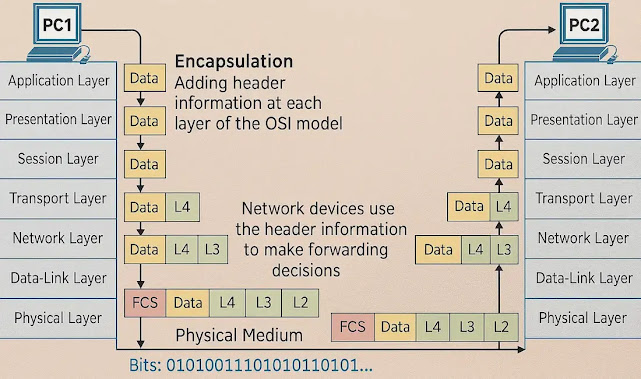
Note: The image shows the Presentation and Session layers. For general networking, they are included in the Application layer, which handles their functionalities. In modern Web applications, these layers are often considered separately.
The sender (PC1):
You pick a photo on your phone and tap “Send”.
In the image above the is the data.The photo is split into small parts (segments). Each part gets a number so nothing is lost and everything can be rebuilt in the right order when arriving to the receiver side.
The added headers are marked as L4.Each segment gets the destination IP address, and the network chooses the best path to reach your friend’s device.
The added headers are marked as L3.The segments are packed into frames and prepared to safely travel inside the local network.
The added headers are marked as L2 and FCS.The frames are turned into signals (electrical, light, or wireless) that physically travel through cables or Wi-Fi.
No headers are added because at this point the frame in converted to bits and transferred.
The receiver (PC2):
The bites arrive and are converted back into digital data.
The frames are rebuilt and checked to make sure no errors happened during the transfer.
The device reads the IP address and confirms the data reached the correct destination.
All segments are put back in the correct order and rebuilt into the original complete photo.
The app opens the restored data, and your friend can see the photo.
Important points
OSI is a theoretical model: It helps understand how communication works in networks.
Dividing into layers: Dividing the process into layers helps us understand and troubleshoot each part. It’s also very useful for developers, because they don’t have to “reinvent the wheel” every time they want to develop a new application.
each layer adds its own headers and handles its job independently.
Tools
Tools for exploring and understanding OSI layers:
- Wireshark - a visual tool to see and analyze network traffic.
- …
Learning Path
Recommended order for learning the subtopics.
- Begin with Layer 5 and proceed step by step down to Layer 1 (see the subtopics)
- …
Related Topics
- …